
Importing Images
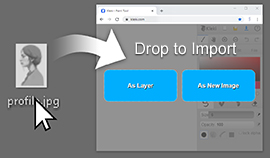
You can import images by dragging them onto the canvas. Kleki will let you use the imported file as a new layer or start a new image from it.
You can also use File > Import.
Supported Formats
Section titled “Supported Formats”Kleki supports common web image formats such as JPEG and PNG. It can also open PSD files with limitations. Other browser-supported formats, such as SVG, WEBP, BMP, and GIF, may work depending on the browser and file.
- Import line art on its own layer before coloring.
- Keep a copy of the original file outside the browser.
- Large images use more memory and may make the browser slower.