
Paint Bucket
The paint bucket fills connected areas with the selected color. It is especially useful for coloring line art.
Clean Fill Workflow
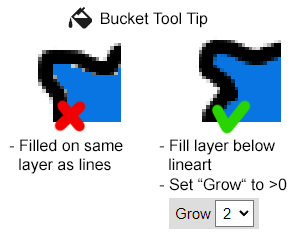
Section titled “Clean Fill Workflow”- Put your line art on its own layer.
- Select the layer below the line art.
- Choose the paint bucket.
- Set Grow to a value greater than
0. - Click inside the area you want to fill.
Grow expands the filled area by the selected number of pixels. This helps color reach under antialiased line edges so white outlines do not remain visible.
Fix Leaking Fills
Section titled “Fix Leaking Fills”If color spreads into areas you did not intend to fill, lower Tolerance. If that does not help, inspect the line art for gaps. Even a tiny one-pixel opening can let the fill escape.