
Saving Your Work
Use File > Save to download your image to your device, usually into your Downloads folder.
Choose a Format
Section titled “Choose a Format”- PNG saves a lossless image without layers.
- JPEG saves a smaller, compressed image without layers. Use it for photographs or sharing when you do not need transparency.
- PSD saves layer information so you can reopen the file in Kleki or other art software that supports Photoshop files.
- Layers saves each layer as a separate PNG.
Keep Layers
Section titled “Keep Layers”Choose Save PSD when you want to continue editing layers later. Kleki restores layers when opening supported PSD files.
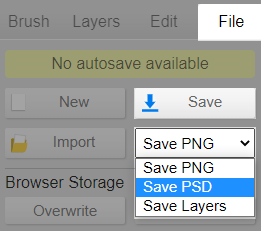
PSD files can also be useful when moving a drawing to apps such as Krita or Clip Studio Paint, although compatibility depends on the features used in the file.
If Saving Fails
Section titled “If Saving Fails”Check that your device has enough free disk space and that your browser is allowed to download files. On managed school or work devices, browser downloads may be restricted by an administrator.