
Saving Your Work
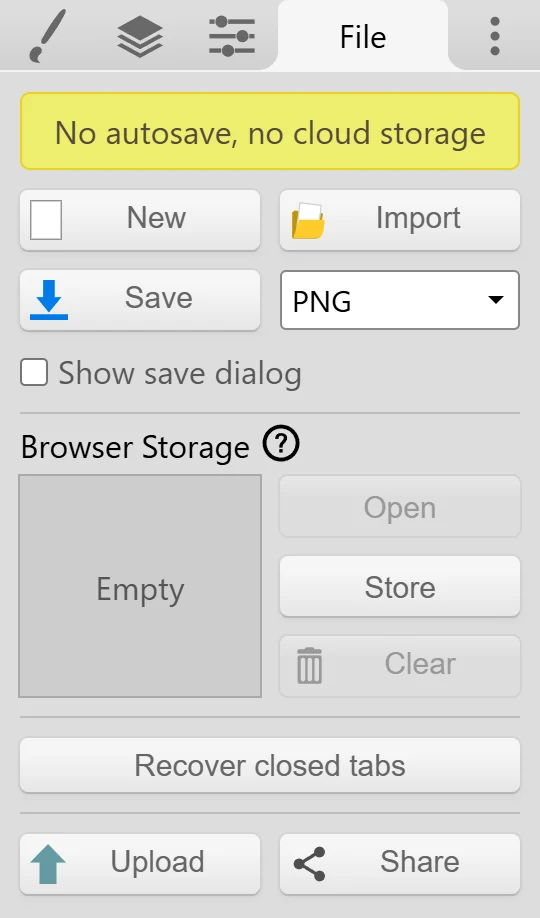
Kleki has no autosave and no cloud storage. Save regularly so you don’t lose your work.
Save a File
Section titled “Save a File”Click  Save in the top row or in the File tab, or press Ctrl + S (Cmd + S on a Mac). The file goes to your device, usually into your Downloads folder.
Choose a Format
Section titled “Choose a Format”Next to Save in the File tab is the File Format dropdown with PNG, JPG, PSD, and Layers (PNG). Picking a format saves right away in that format. After that, Save and Ctrl + S keep using it.
| Format | Use it for |
|---|---|
| PNG | Finished images and sharing. Keeps transparency. |
| JPG | Smaller files, for example for photos. No transparency: transparent areas turn black. |
| PSD | Keeping your layers, to continue later in Kleki or in another app. |
| Layers (PNG) | Getting every layer as a separate PNG file. |
See File Formats for what each format keeps.
Keep Your Layers
Section titled “Keep Your Layers”To continue working on your drawing later, save it as PSD. In the File tab, open the File Format dropdown and pick PSD. When you open the PSD in Kleki again, all layers are back.
PSD files also open in Krita, Photoshop, Clip Studio Paint, GIMP, and Photopea.
Choose Where Files Go
Section titled “Choose Where Files Go”In Chrome, Edge, and other browsers that support it, the File tab has a Show save dialog checkbox. Turn it on to pick the folder and file name each time you save.
Other Ways to Keep Your Work
Section titled “Other Ways to Keep Your Work”- Browser Storage keeps one image inside your browser. It’s handy, but it’s not a replacement for saving files.
- Tab recovery can bring back a tab that closed by accident.
- The Save Reminder reminds you when you haven’t saved in a while. See Settings.
If Saving Fails
Section titled “If Saving Fails”- Disk space. Make sure your device has enough free space. If your device can no longer install new apps, it probably doesn’t have enough space.
- Downloads blocked. Make sure your browser is allowed to download files. On school or work devices, an administrator may block downloads.
- Only one file from Layers (PNG). Your browser may ask whether kleki.com may download multiple files. Allow it.
- Can’t find the file. Check your Downloads folder, or turn on Show save dialog.